Skip to content

Roads · turns · signals

Traffic Architect Tools & Troubleshooting

Traffic Architect help starts with the change you want to make. Choose the road operation or junction setting, then check the Demo or full-release version behind the advice.

Find your next guide

What are you working on?

Road building

Find Traffic Architect road help by goal: edit an existing road, choose a bridge or tunnel level, or copy the right parallel-road section.

Junctions & signals

Choose Traffic Architect help for allowed turns, traffic-light timings and phases, or interchange placement. Check the tool and version before editing.

Troubleshooting

Diagnose Traffic Architect unreachable routes, undo and refunds, or a version mismatch before retrying a road edit or resetting a junction.

Controls & versions

Find documented Traffic Architect PC tool keys, Mac alternatives and edition checks before applying a shortcut or a full-release fix to the Demo.

Choose the right layer

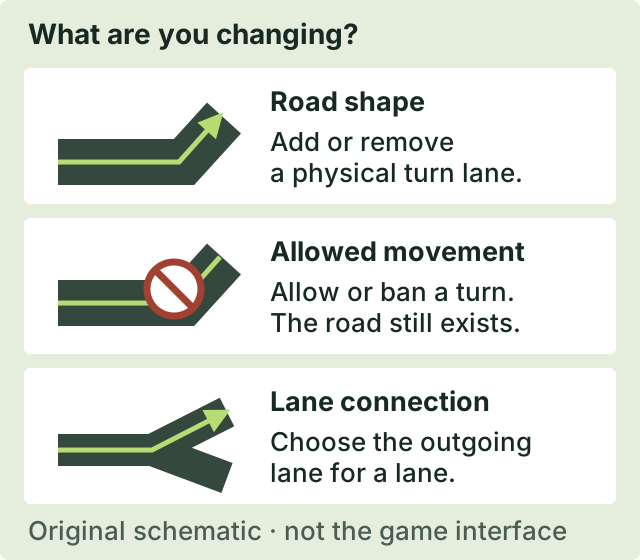
A turn lane is not a turn ban.

Road geometry changes the physical layout. Restrictions change permitted movements. Lane connections specify which outgoing lane a vehicle can use. Check the layer before resetting a junction.

Compare the three turn operations
Original schematic separating road shape, allowed turns and lane-to-lane connections.
Original functional schematic. Not a game screenshot or an exact interface layout.

Use the current explanation, not an old bug claim.

These guides separate player reports from developer explanations and announced fixes. A remaining problem needs its own version and conditions; no workaround here is promised to repair every save.

Check the original sources